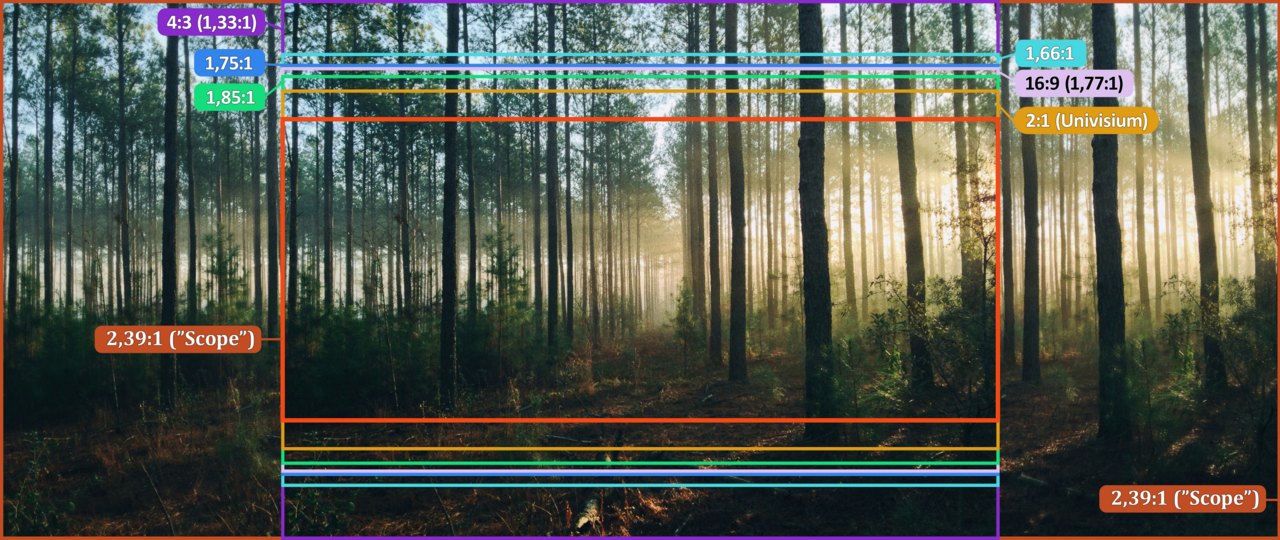
A film can display black bars on a television that is working perfectly. What matters is not just the size of the set but the relationship between width and height. If the film and screen have different shapes, showing the whole picture without distortion leaves some unused space. Those bars are then outside the film image, rather than evidence of missing content.
Shape is different from resolution
With 16:9, sixteen units of width correspond to nine units of height, or approximately 1.78:1. An image at 2.39:1 is considerably wider in relation to its height. Showing all of it on a 16:9 screen normally leaves space above and below. A 4:3 picture is narrower, so displaying the complete image leaves space at the sides instead.
These ratios do not tell you how sharp the material is. Low-resolution and high-resolution images can share the same shape. Removing the bars does not add detail to a film. Shape, resolution and the size at which something appears on the screen are three separate properties, even though television menus sometimes place their controls close together.
Filling the screen involves a choice
Imagine a shot with someone beside a window on the left and another person waiting in a doorway on the right. Enlarging the wide image until it fills the screen vertically may remove parts of both figures. The centre becomes bigger, but the relationship between the people changes. This is cropping, not the restoration of previously missing picture information.
Another setting may stretch the image unevenly. More of the content might remain visible, but shapes change: a circle becomes an oval and faces look wider or narrower. A display can preserve proportions, fill its surface and show the entire image simultaneously only when the original shapes match. Otherwise at least one of these conditions must be sacrificed.
Netflix accordingly explains that bars can preserve the original format and that zooming on some mobile devices cuts off picture edges. The names of these settings differ between devices. Rather than trusting a label such as full screen, watch what actually happens to the edges and proportions when it is selected.
A comparison that needs no measuring equipment
Pause on a scene with clear spatial features. Compare the complete-image setting with an available zoom level. Watch objects at all four edges, not only faces in the centre. A door frame, a sign or a hand near the border often makes cropping more obvious than a landscape does.
Return to the complete picture and play a moving passage. Subtitles and other information may appear near an edge. A setting that seems harmless in one shot can remove something significant later. Persistent enlargement should therefore be a deliberate viewing choice, rather than an automatic response to any unused screen space.
A numerical example of cropping
A numerical example makes the scale clearer. On a surface 1920 units wide and 1080 units high, a 2.39:1 image shown at full width occupies roughly 803 units of height. The remaining space lies above and below. This calculation describes idealised geometry, not necessarily the actual pixel structure of every release.
To fill the full height of 1080, the same wide picture would need to appear about 2581 units wide. The screen cannot contain that width, leaving roughly 661 units outside the visible area in total. This shows why zooming changes more than the bars. In a scene with two widely separated people, the lost edges may explain their relationship. The same intervention might be less obvious in a central close-up, while remaining geometrically identical. A setting that seems harmless in one test image therefore offers no guarantee for the rest of the film.
When the borders change unexpectedly
Not every film maintains the same visible picture shape throughout its running time. First consider a change within the scene: does it coincide with another period, different source material or a noticeable formal shift? This does not prove a particular production intention, but it helps avoid an unnecessary adjustment while the film is playing.
If the playback menus also look distorted, or labels are consistently missing at the screen edge, inspect the device settings. Compare another familiar signal to help locate the issue. A complete picture with plausible proportions is a useful starting point. Whether the remaining borders bother you is a viewing preference; their mere presence does not demonstrate a fault.